Reference for Database Management
This guide lists the predefined objects in OCI Resource Analytics for the Database Management service. You can find information about views, entity relationships, subject areas, and sample queries.
Views
This section provides information about views within OCI Resource Analytics Database Management and their columns, data types, keys, and the referred view and column names. The following views are available:
| Name | Description |
|---|---|
| DATABASE_MANAGEMENT_ASM_DIM_V | This view stores information about the details of a cloud or external ASM. |
| DATABASE_MANAGEMENT_ASM_INSTANCE_DIM_V | This view stores information about the details of a cloud or external ASM instance. |
| DATABASE_MANAGEMENT_CLUSTER_INSTANCE_DIM_V | This view stores information about the details of a cloud or external cluster instance. |
| DATABASE_MANAGEMENT_CLUSTER_DIM_V | This view stores information about the details of a cloud or external cluster. |
| DATABASE_MANAGEMENT_DB_HOME_DIM_V | This view stores information about the details of a cloud or external database home. |
| DATABASE_MANAGEMENT_DB_NODE_DIM_V | This view stores information about the details of a cloud or external database node. |
| DATABASE_MANAGEMENT_DB_SYSTEM_DIM_V | This view stores information about the details of a cloud or external DB system. |
| DATABASE_MANAGEMENT_JOB_DIM_V | This view stores information about the details of the job. |
| DATABASE_MANAGEMENT_DB_SYSTEM_CONNECTOR_DIM_V | This view stores information about the details of a cloud or external DB system connector. |
| DATABASE_MANAGEMENT_EXT_EXA_INFRASTRUCTURE_DIM_V | This view stores information about the details of the Exadata infrastructure. |
| DATABASE_MANAGEMENT_EXT_EXA_STORAGE_CONNECTOR_DIM_V | This view stores information about the details of the Exadata storage server connector. |
| DATABASE_MANAGEMENT_EXT_EXA_STORAGE_GRID_DIM_V | This view stores information about the details of the Exadata storage server grid. |
| DATABASE_MANAGEMENT_EXT_EXA_STORAGE_SERVER_DIM_V | This view stores information about the details of the Exadata storage server. |
| DATABASE_MANAGEMENT_JOB_EXECUTION_DIM_V | This view stores information about the details of a job execution. |
| DATABASE_MANAGEMENT_JOB_RUN_DIM_V | This view stores information about the details of a specific job run. |
| DATABASE_MANAGEMENT_LISTENER_DIM_V | This view stores information about the details of a listener. |
| DATABASE_MANAGEMENT_MANAGED_DATABASE_DIM_V | This view stores information about the details of a Managed Database. |
| DATABASE_MANAGEMENT_MANAGED_DATABASE_GROUP_DIM_V | This view stores information about the details of a Managed Database Group. |
| DATABASE_MANAGEMENT_NAMED_CREDENTIAL_DIM_V | This view stores information about the details of a named credential. |
| DATABASE_MANAGEMENT_PRIVATE_ENDPOINT_DIM_V | This view stores information about a Database Management private endpoint, which allows Database Management to connect to databases in a Virtual Cloud Network (VCN). |
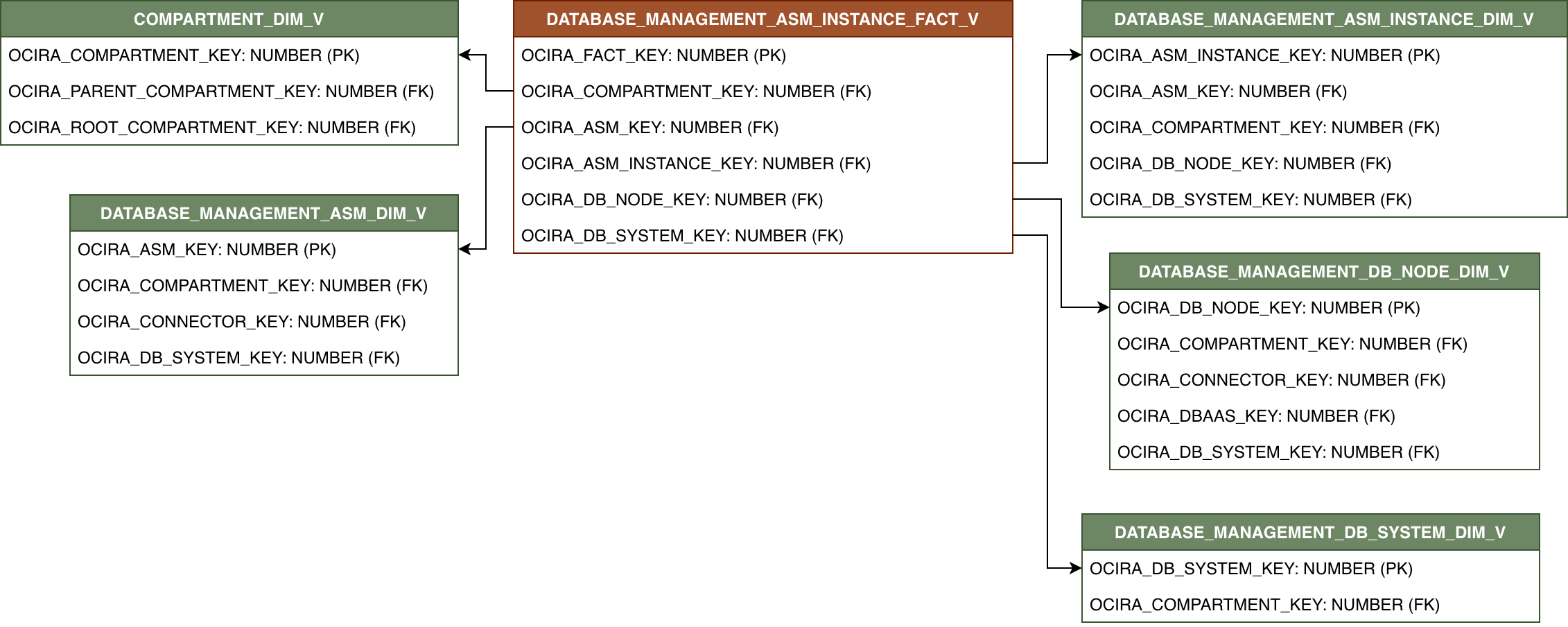
| DATABASE_MANAGEMENT_ASM_INSTANCE_FACT_V | Fact table for ASM instances. |
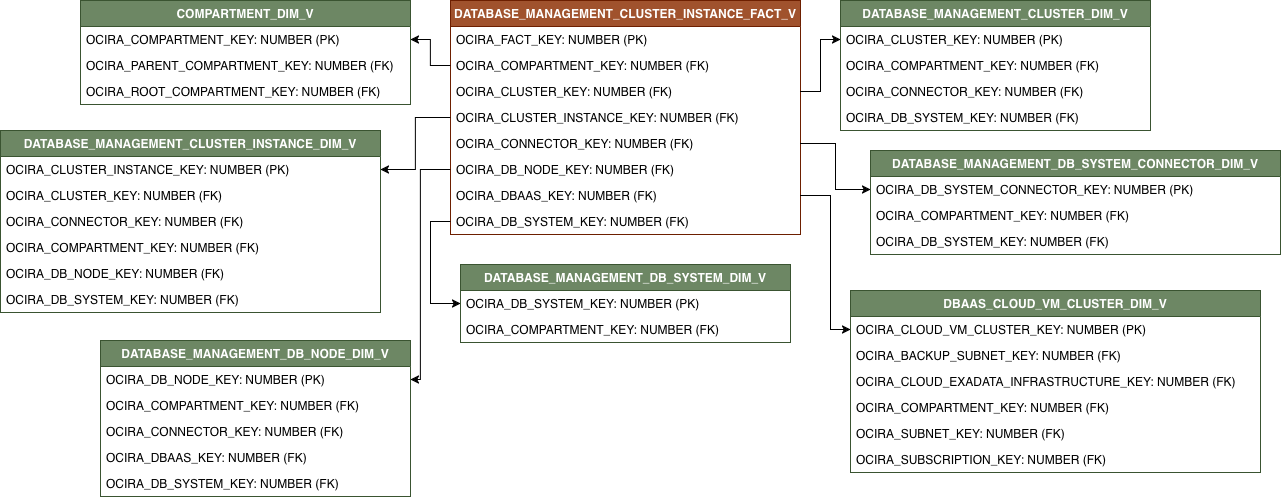
| DATABASE_MANAGEMENT_CLUSTER_INSTANCE_FACT_V | Fact table for Cluster instances. |
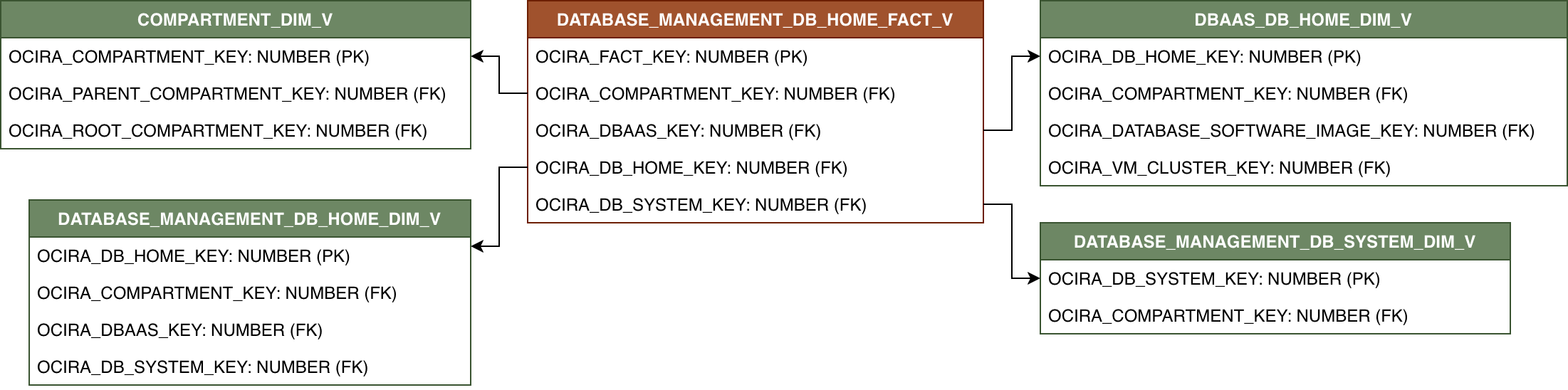
| DATABASE_MANAGEMENT_DB_HOME_FACT_V | Fact table for DB homes. |
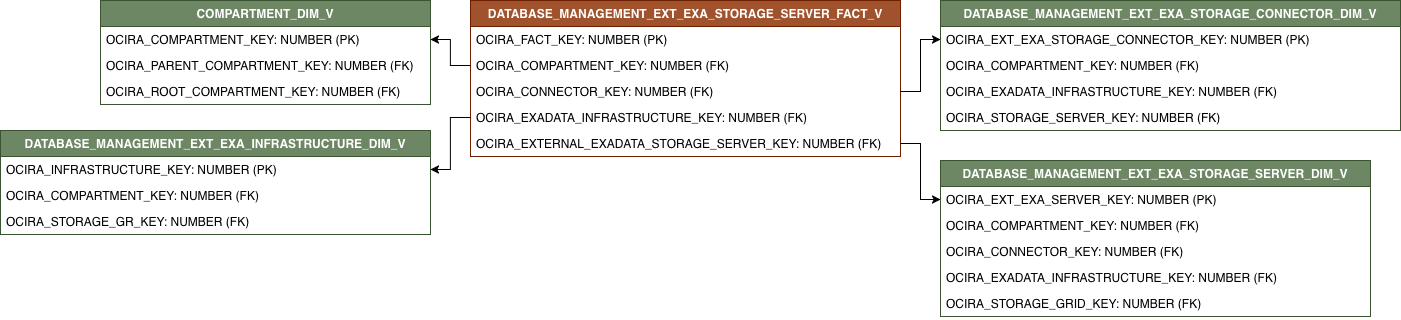
| DATABASE_MANAGEMENT_EXT_EXA_STORAGE_SERVER_FACT_V | Fact table for external Exadata storage servers. |
| DATABASE_MANAGEMENT_JOB_EXECUTION_FACT_V | Fact table for job executions. |
| DATABASE_MANAGEMENT_LISTENER_FACT_V | Fact table for listeners. |
| DATABASE_MANAGEMENT_PRIVATE_ENDPOINT_FACT_V | Fact table for private endpoints. |
The suffixes in the view names specify the view type:
- FACT_V: Fact
- DIM_V: Dimension
Relationship Diagram
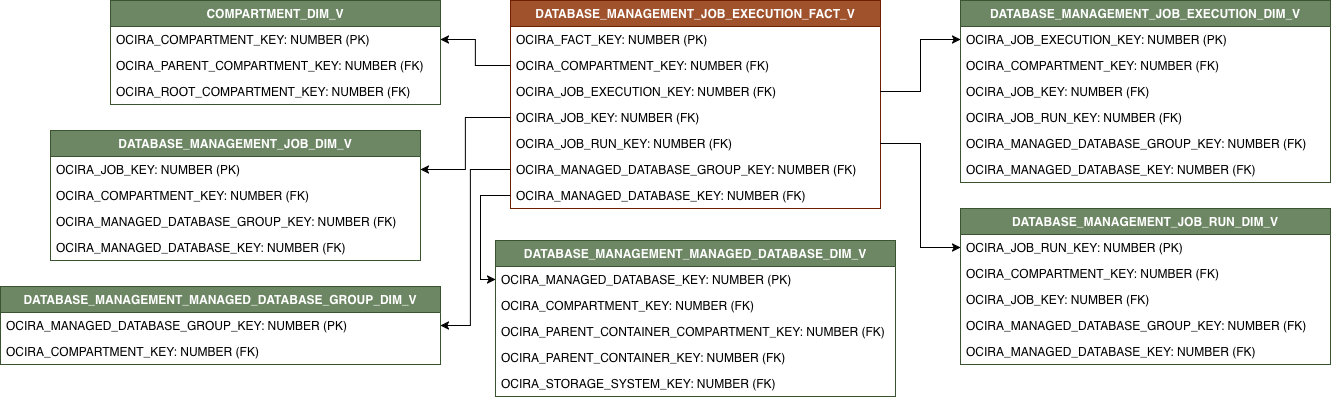
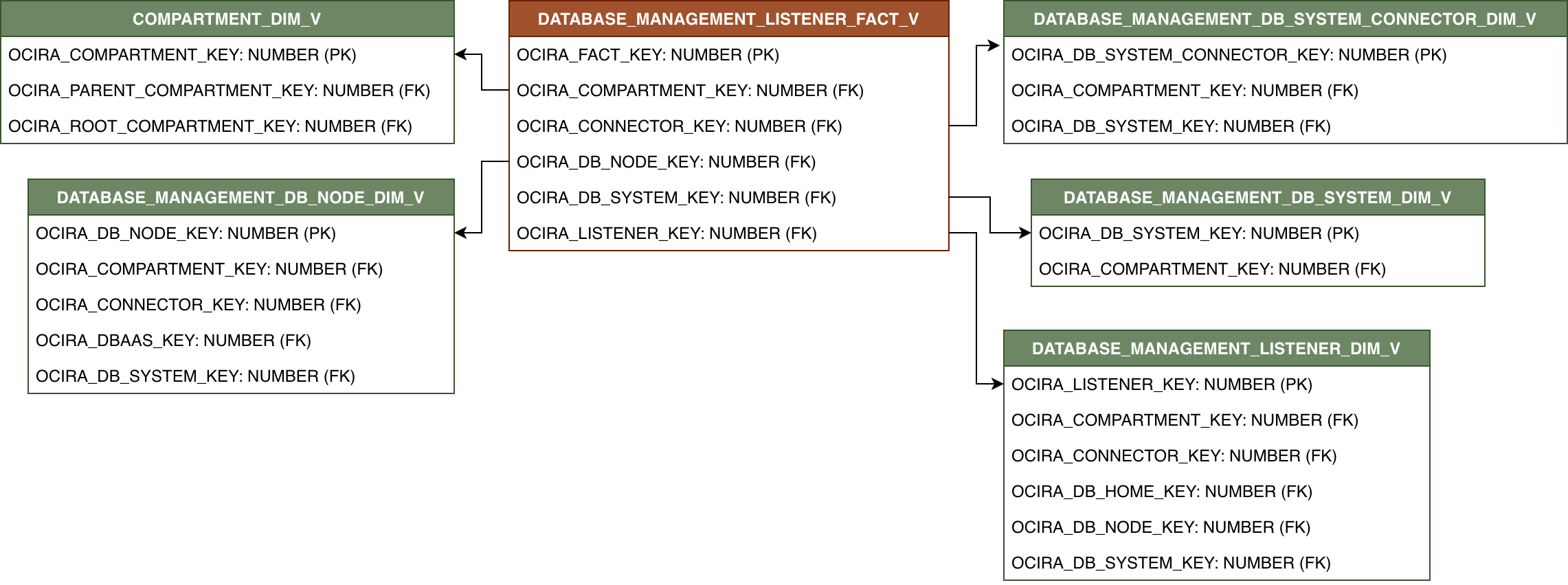
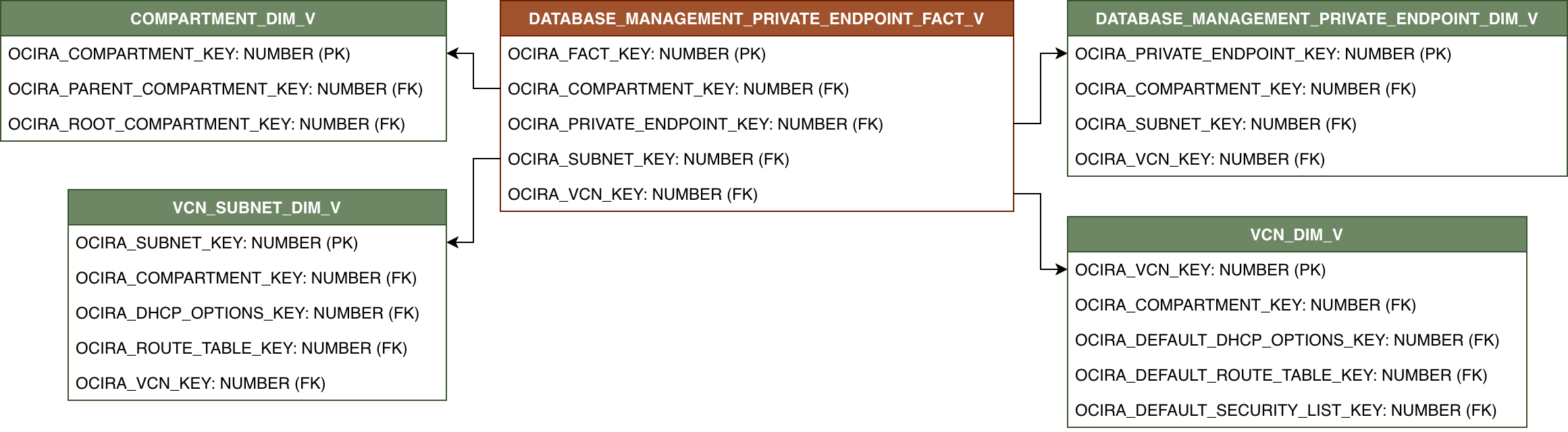
This section provides diagrams that define the logical relationship of a fact table with different dimension tables.
The contents of each view and their relationships are listed in the following file: Database Management views.
DATABASE_MANAGEMENT_ASM_INSTANCE_FACT_V
DATABASE_MANAGEMENT_CLUSTER_INSTANCE_FACT_V
DATABASE_MANAGEMENT_DB_HOME_FACT_V
DATABASE_MANAGEMENT_EXT_EXA_STORAGE_SERVER_FACT_V
DATABASE_MANAGEMENT_JOB_EXECUTION_FACT_V
DATABASE_MANAGEMENT_LISTENER_FACT_V
DATABASE_MANAGEMENT_PRIVATE_ENDPOINT_FACT_V
Relationships exist among dimensions. These diagrams show relationships between dimension views.
DATABASE_MANAGEMENT_EXT_EXA_STORAGE_GRID_DIM_V

DATABASE_MANAGEMENT_NAMED_CREDENTIAL_DIM_V

Sample Queries
Sample queries for Database Management.
List the number of ASM instances by ASM:
SELECT
    ASM_ID,
    COUNT(ASM_INSTANCE_ID) AS ASM_INSTANCE_COUNT
FROM OCIRA.DATABASE_MANAGEMENT_ASM_INSTANCE_FACT_V
GROUP BY ASM_ID;
List the number of cluster instances by cluster:
SELECT
    CLUSTER_ID,
    COUNT(CLUSTER_INSTANCE_ID) AS CLUSTER_INSTANCE_COUNT
FROM OCIRA.DATABASE_MANAGEMENT_CLUSTER_INSTANCE_FACT_V
GROUP BY CLUSTER_ID;
List the number of DB homes by region:
SELECT
    REGION,
    COUNT(DB_HOME_ID) AS DB_HOME_COUNT
FROM OCIRA.DATABASE_MANAGEMENT_DB_HOME_FACT_V F
GROUP BY REGION;
List the CPU count by external exadata storage server and its associated connector:
SELECT
    EXTERNAL_EXADATA_STORAGE_SERVER_ID,
	CONNECTOR_ID,
    SUM(CPU_COUNT) AS TOTAL_CPU_COUNT
FROM OCIRA.DATABASE_MANAGEMENT_EXT_EXA_STORAGE_SERVER_FACT_V F
GROUP BY EXTERNAL_EXADATA_STORAGE_SERVER_ID, CONNECTOR_ID;
List the number of job executions by job:
SELECT
    JOB_ID,
    COUNT(JOB_EXECUTION_ID) AS JOB_EXECUTION_COUNT
FROM OCIRA.DATABASE_MANAGEMENT_JOB_EXECUTION_FACT_V F
GROUP BY JOB_ID;
List the number of listeners by DB system:
SELECT
    DB_SYSTEM_ID,
    COUNT(LISTENER_ID) AS LISTENER_COUNT
FROM OCIRA.DATABASE_MANAGEMENT_LISTENER_FACT_V F
GROUP BY DB_SYSTEM_ID;
List the number of private endpoints by subnet and VCN:
SELECT
    SUBNET_ID,
	VCN_ID,
    COUNT(PRIVATE_ENDPOINT_ID) AS PRIVATE_ENDPOINT_COUNT
FROM OCIRA.DATABASE_MANAGEMENT_PRIVATE_ENDPOINT_FACT_V F
GROUP BY SUBNET_ID, VCN_ID;
Data Lineage
The Customer Experience Semantic Model Lineage spreadsheet and Metric Calculation Logic spreadsheet for Database Management provides an end-to-end data lineage summary report for physical and logical relationships in your data.
For more information, see Data Lineage.
Subject Areas
This section provides information on the subject areas with data you maintain in Database Management. These subject areas, with their corresponding data, are available for you to use when creating and editing analyses and reports. The information for each subject area includes:
-
Description of the subject area.
-
Business questions that can be answered by data in the subject area, with a link to more detailed information about each business question.
-
Job-specific groups and duty roles that can be used to secure access to the subject area, with a link to more detailed information about each job role and duty role.
-
Primary navigation to the work area that's represented by the subject area.
-
Time reporting considerations in using the subject area, such as whether the subject area reports historical data or only the current data. Historical reporting refers to reporting on historical transactional data in a subject area. With a few exceptions, all dimensional data are current as of the primary transaction dates or system date.
-
The lowest grain of transactional data in a subject area. The lowest transactional data grain decides how data are joined in a report.
-
Special considerations, tips, and things to look out for in using the subject area to create analyses and reports.
Other References
This section provides other references related to Database Management.
Oracle Cloud Infrastructure Documentation / API Reference
- Database Management Documentation
- CloudAsm Reference
- CloudAsmInstance Reference
- CloudCluster Reference
- CloudClusterInstance Reference
- CloudDbHome Reference
- CloudDbNode Reference
- CloudDbSystem Reference
- CloudDbSystemConnector Reference
- CloudListener Reference
- DbManagementPrivateEndpoint Reference
- ExternalExadataInfrastructure Reference
- ExternalExadataStorageConnector Reference
- ExternalExadataStorageGrid Reference
- ExternalExadataStorageServer Reference
- Job Reference
- JobExecution Reference
- JobRun Reference
- ManagedDatabase Reference
- ManagedDatabaseGroup Reference
- NamedCredential Reference